
What's new:
- Added Russian language
- Couple of improvements and bug fixes
Stay up to date with the latest releases, tips and insights.
What's new:

I write and have taught classes for adults, two activities that require taking and organizing notes. I wrote in a previous post about why I chose EssentialPIM for storing my extensive notes. This post shows how EPIM helps me organize them.
Software reviewers say the best outliner apps make it easy to see your information, easy to arrange and rearrange and easy to find. EssentialPIM excels at each of these.

We announce the immediate availability of EssentialPIM 9.2. New and improved features included in the release are as follows:
The full list of changes is recorded in the Version History.
Update to EssentialPIM Pro 9.2 is free for you if you purchased the regular license with 1 year of free updates after July 15, 2019. All the lifetime license owners get this and all future versions update for free. To renew or upgrade your license, head over to the Pricing page.
For new version downloads please visit the Get EPIM page or wait till you get notification form the EPIM’s auto-update system.

What's new:

I have been using EssentialPIM since 2009, first the free version and then I ended up buying the lifetime license because this tool quickly became essential. The features of the pro version are limitless. I searched for a long time and I finally found what I needed! I like the fact that the EPIM team is very active and responsive. Each time I asked them, they always responded attentively to our needs (EssentialPIM Android and Windows).
There are regular updates, always with something new, that make this an efficient tool.
We announce the immediate availability of EssentialPIM Pro and EssentialPIM Free 9.1 This release introduces significant improvements to the recently introduced anchors feature in notes (you will now be able to rename anchors, delete multiple anchors at once and link to the anchors through the common Insert Hyperlink dialog window for more efficient workflow), adjustments to spam filter logic for more intelligent detection of spam, improved synchronization with Office 365 accounts and couple of other improvements and optimizations. The detailed list of changes is available on the Version History page.
Update to EssentialPIM Pro 9.1 is free for all the lifetime license owners and if you purchased the regular 1-year of free updates license after the June 15-th 2019. Check out the renewal and upgrade options on the Pricing page, should you need to update your license.
The 9.1 version is being distributed in stages so it might take couple of days till it reaches you. You can always check whether the update is already available by clicking on Help->Check for Updates. Another option would be to update manually by downloading the latest version from the Get EPIM page.

How do you use EssentialPIM?
The answers are as varied as the people who use this app to manage their personal information.
I put the question to the EPIM family, first by exploring the forum for posts about EPIM's use and then by contacting some directly about their experience.

We're very excited to announce the release of EssentialPIM 9.0! Below is the list of the new major features that are included in this version:
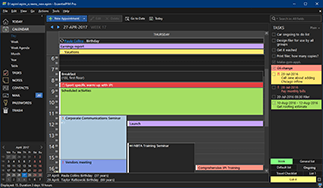
Enhancing visual ergonomics, EssentialPIM is now offering you a more comfy user interaction within the software. Incorporating Dark Theme, the program uses a darker palette for windows and controls. Reduce the eye strain and organize your information effectively!
Big thanks to Windows Report (a software and hardware expertise web site that helped 500MM+ PC users guiding them with how-to advice, news and tips) for ranking us 1st and recommending EssentialPIM in their annual coverage "11 Best Information Organizer Software to use (2020 Guide)".
We promise that we will continue to live up to people's expectation and provide the best Personal Information Manager experience there is.
What's new: